It records meetings too
Both sides of the call. Never mixed up.
Most tools take one mixed track and guess who spoke. PipeVoice captures your microphone and your computer's audio as two separate streams, so what you said and what they said can't be confused.
New · Live answers
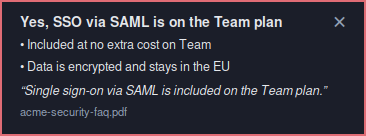
The answer pops up while they're still asking.
When the other side asks something your documents cover, a card appears in the corner with what to say, two short points, and the exact line from your document it came from. If it isn't sure, nothing pops up.
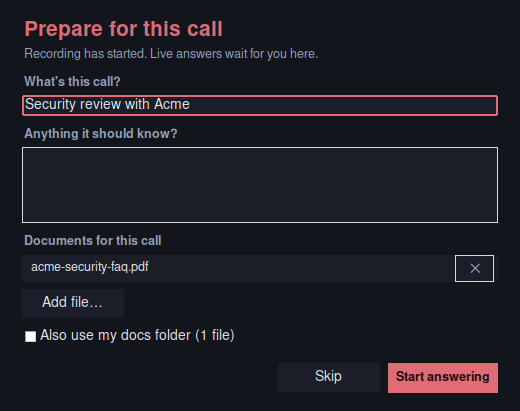
- Start a meeting. Prepare for this call opens: say what the call is and add the documents for it — a pricing sheet, an FAQ, a CV — or use your docs folder.
- Talk. Only their side of the call is listened to, so your own questions never trigger a card.
- After the call, every question they asked is listed with its answer, or Not in your docs — your list of what to write next.
Reads PDF, Markdown and text files, plus one web page. Needs Deepgram for live transcription (about 30¢ an hour) and the AI key you already use for polish, such as a free Gemini key.
Two streams, not guesswork
A hotkey starts and stops it. Your mic and the call's audio are recorded separately, so you are never mistaken for the other person. Remote speakers are still separated, and your dictation hotkey switches itself off while recording so a stray press can't interrupt.
Put names to voices
Click a "Them 1" label and it plays the clearest two seconds of that person, so you can recognise them and type their name. Names never overwrite the original transcript.
Say "bookmark that"
Mark a moment just by saying so — no key, no hands. Nothing listens live; the phrase is found when the recording is transcribed, so it costs nothing and works offline. A bookmark marks the half-minute before it, because you always react after the interesting bit.
Notes and action items
Turn a meeting into bullet points, to-dos, or actions with an owner and a deadline. Moments you bookmarked get priority. It won't invent owners or dates nobody agreed to.
Fix a word once
Right-click any word in a transcript and correct it. It changes every occurrence — and if you like, the same fix applies to your normal typing from then on. So a name it keeps mishearing gets fixed once, not every time.
Search every meeting
Find a word across all your recordings, not just the one you have open — with a match count and a snippet of where it came up. It searches what you see, so a name you have corrected is findable by its corrected spelling.
Tidy it up, or don't
One press strips "um", "uh" and false starts and fixes punctuation. It only tidies — it never rewords anyone or changes what was said — and the raw transcript stays one click away.
See who did the talking
Each person's share of the conversation, how many turns they took, how many questions they asked, and the longest stretch nobody interrupted. Worked out from the transcript on your own machine, so it costs nothing and works offline.
A nudge when a call drifts
Optional. PipeFocus watches the conversation live and speaks up only when something concrete is going wrong — an action item nobody has taken, a decision deferred again. At most one nudge every few minutes, and silent when nothing is wrong. Needs Deepgram, and costs about 30¢ an hour of meeting.
Send it on
Export a meeting as Markdown, a self-contained web page you can print straight to PDF, or slides. Everything you see comes with it — highlights, notes and named speakers.
Recordings stay on your machine. Transcription runs through Deepgram, or fully offline with local Whisper if you would rather nothing left the building. Two things worth knowing: your computer's audio is captured as one mix, so pause any music first — and recording other people may need their consent where you live.